 What does it mean to zip and unzip files? A zip file is one file that contains many files. Think of zipping up stuff in your purse or a fanny pack (I haven’t seen too many fanny packs in a while). Unzipping would be the reverse. Open up the purse or fanny pack and dump the contents out.
Why would you want to zip up a bunch of files? Well, with most email services you can’t send a bunch of big files as attachments, so you could zip those files up into one file to send as an attachment in an email. Of course the recipient would have to unzip the zip file.
Another reason would be to download something like a, hmmm, a WordPress theme to try out. WordPress themes are made up of multiple files. So, typically you download the theme and unzip the files to your http://www.MyIncredibleBlogThatEveryoneWantsToRead.com/wp-content/themes folder.
Let’s take a look at doing that.
Here’s a screen shot of the zipped up the WordPress theme StudioPress from DailyBlogTips.

I could certainly right-click on the zipped file and select the Vista built-in Extract selection which would probably take forever to unzip (extract) because extracting files in Vista can be painfully slow. So instead of discussing that issue right now, we’ll use the freely available 7-Zip zip and unzipper program. Here’s the context menu you’ll see after right-clicking on the zip file.

When I right-click on the zipped file, I select 7-Zip -> Open archive. This will allow us to look at the inside of the zip file so we can explore the contents first, before we unzip the files. Here’s what you’ll see.

Here’s the contents of the zipped file before it’s unzipped. This allows you to look through the zipped file before extracting the files out of the zip file. This also allows you to unzip one file, a few files or all the files.

For now we’ll click on the blue minus sign to extract all files to the default folder. Now that’s a lot faster using 7-Zip instead of the default Vista zip tool. You can download 7-Zip here.
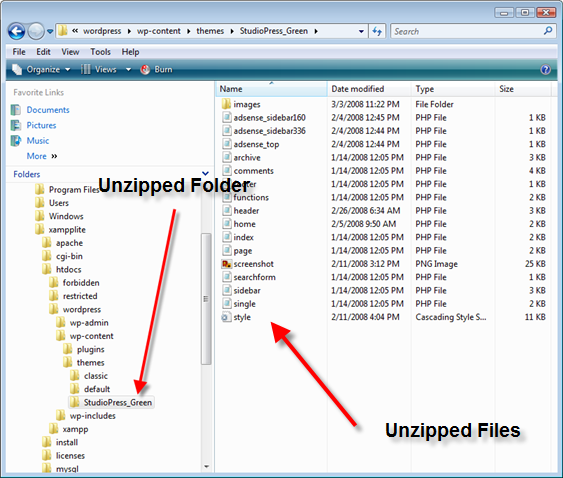
And here is the final unzipped file placed in the folder we want it.

To zip everything back up again you would right-click on the folder StudioPress_Green and select 7-Zip -> Add to archive… Then you would have a zipped up file again. There are many other features in zip programs you can play with to see the results.
Here are two free zip/unzip programs:
Commercial Zippers
PkZip and WinZip are commercial, pay for zip tools. They offer the same amount of functionality as the free ones and more. For instance, PkZip can be set to automatically zip attached files to an email before the email is sent. This can be both convenient and annoying at times.
With all this zipping it reminded me of one of the Austin Powers movies where Dr. Evil was trying to get his son Scott to…Zip It!! Enjoy.
Photo Credit: wingless girl
I use Winrar but seems that 7-zip is better, i will check it.
Renatos last blog post..1
This is a great comprehensive tutorial. I am using Winzip, winrar and as well another software which create msi executable files, which is create when create and restore backup. Actually I think 7-zip offers the best levels of compression.
It’s a shame that Windows doesn’t come with out of the box compatibility for these file types. Before I moved my main machine to Ubuntu, I always favoured 7zip for it’s small install size and no fee. WinRar and Winzip are useful, but unless you have a specific need for one of their additional functions, offer little over the free alternatives.
7zip its free it works and is small that’s all i need.